Table Compression Enhancements in Oracle Database 11g R1 :
Table compression was introduced in Oracle 9i as a space saving feature for data warehousing projects. In 11g it is now considered a mainstream feature that is acceptable for OLTP databases. In addition to saving storage space, compression can result in increased I/O performance and reduced memory use in the buffer cache. These advantages do come at a cost, since compression incurs a CPU overhead, so it won’t be of benefit to everyone.
Basic table compression is a free feature of the Enterprise Edition database, but OLTP compression requires the Advanced Compression option.
The compression clause can be specified at the tablespace , table or partition level with the following options:
- NOCOMPRESS – The table or partition is not compressed. This is the default action when no compression clause is specified.( turns off compression )
- COMPRESS – This option is considered suitable for data warehouse systems. Compression is enabled on the table or partition during direct-path inserts only.
- Extended COMPRESS caluse: COMPRESS [BASIC | FOR OLTP]
- BASIC – default, bulk-load operations from prior releases
- FOR OLTP – it’s new used for OLTP + direct loads
- COMPRESS FOR DIRECT_LOAD OPERATIONS – This option has the same affect as the simple COMPRESS keyword. It is equal to COMPRESS, COMPRESS BASIC
- COMPRESS FOR ALL OPERATIONS – This option is considered suitable for OLTP systems. As the name implies, this option enables compression for all operations, including regular DML statements. – it’s equal to COMPRESS FOR OLTP
This option requires the COMPATIBLE initialization parameter to be set to 11.1.0 or higher. In 11gR2 this option has been renamed to COMPRESS FOR OLTP and the original name has been deprecated.
Restrictions Associated With Table Compression:
The restrictions associated with table compression include:
- Compressed tables can only have columns added or dropped if the COMPRESS FOR ALL OPERATIONS option was used.
- Compressed tables must not have more than 255 columns. ( BASIC and FOR OLTP are not supported for tables with more than 255 columns )
- Compression is not applied to lob segments. ( COMPRESS [BASIC|FOR OLTP] is not used for BasicFile LOBs.)
- Table compression is only valid for heap organized tables, not index organized tables. ( Compression can be different for each partition )
- The compression clause cannot be applied to hash or hash-list partitions. Instead, they must inherit their compression settings from the tablespace, table or partition settings.
- Table compression cannot be specified for external or clustered tables.
- Columns can only be dropped for compressed tables only by setting as unused.
- New columns COMPRESS, COMPRESS_FOR are added in views DBA_ / ALL_ / USER_Tables and DBA_ /ALL_ / USER_TAB_PARTITIONS .
Turn on compression for new table :
CREATE TABLE Pawan_tab_1 (

  id            NUMBER(10)    NOT NULL,

  description   VARCHAR2(50)  NOT NULL,

  created_date  DATE          NOT NULL

   )

COMPRESS FOR ALL OPERATIONS;

-------------------------------------------------

CREATE TABLE Pawan_tbl_basic COMPRESS

AS

SELECT * FROM dba_objects;

-------------------------------------------------

CREATE TABLE Pawan_tbl_oltp COMPRESS FOR OLTP

AS

SELECT * FROM dba_objects;

-------------------------------------------------

CREATE TABLE Pawan_tbl_nc NOCOMPRESS

AS

SELECT * FROM dba_objects;
Enable compression for existing table:
ALTER TABLE Pawan_tbl_nc COMPRESS FOR OLTP;Turn off compression for existing table:
ALTER TABLE Pawan_tbl_nc NOCOMPRESS;Checking compression option for table:
Table-level compression settings are reflected in the COMPRESSION and COMPRESS_FOR columns of the [DBA|ALL|USER]_TABLES views.
SELECT table_name, compression, compress_for

FROM user_tables

WHERE table_name IN ('PAWAN_TBL_BASIC', 'PAWAN_TBL_OLTP', 'PAWAN_TBL_NC', ' PAWAN_TAB_1');
TABLE_NAME COMPRESSION COMPRESS_FOR
---------------------- ----------------------------- --------------------------------
PAWAN_TBL_BASIC ENABLED BASIC
PAWAN_TBL_NC DISABLED
PAWAN_TBL_OLTP ENABLED OLTP
PAWAN_TAB_1 ENABLED FOR ALL OPERATIONSSpecifying compression on partition level
CREATE TABLE PAWAN_TBL_PART

(id1 NUMBER,

 id2 NUMBER)

PARTITION BY RANGE(id1)

(

  PARTITION P1 VALUES LESS THAN(10) ,

  PARTITION P2 VALUES LESS THAN(20) NOCOMPRESS,

  PARTITION P3 VALUES LESS THAN(30) COMPRESS,

  PARTITION P4 VALUES LESS THAN(40) COMPRESS BASIC,

  PARTITION P5 VALUES LESS THAN(50) COMPRESS FOR OLTP,

  PARTITION P6 VALUES LESS THAN(60) COMPRESS FOR ALL OPERATIONS

);
CREATE TABLE PAWAN_TAB_2 (
id NUMBER(10) NOT NULL,
description VARCHAR2(50) NOT NULL,
created_date DATE NOT NULL
)
PARTITION BY RANGE (created_date) (
PARTITION PAWAN_TAB_Q1 VALUES LESS THAN (TO_DATE('01/01/2008', 'DD/MM/YYYY')) COMPRESS,
PARTITION PAWAN_TAB_Q2 VALUES LESS THAN (TO_DATE('01/04/2008', 'DD/MM/YYYY')) COMPRESS FOR DIRECT_LOAD OPERATIONS,
PARTITION PAWAN_TAB_Q3 VALUES LESS THAN (TO_DATE('01/07/2008', 'DD/MM/YYYY')) COMPRESS FOR ALL OPERATIONS,
PARTITION PAWAN_TAB_Q4 VALUES LESS THAN (MAXVALUE) NOCOMPRESS
);SELECT table_name, partition_name, compression, compress_for
FROM user_tab_partitions
WHERE table_name IN ('PAWAN_TBL_PART', 'PAWAN_TAB_2');
TABLE_NAME PARTITION_NAME COMPRESSION COMPRESS_FOR
------------------ ----------------------- --------------- ----------------- -----------------------
PAWAN_TBL_PART P1 DISABLED
PAWAN_TBL_PART P2 DISABLED
PAWAN_TBL_PART P3 NABLED BASIC
PAWAN_TBL_PART P4 ENABLED BASIC
PAWAN_TBL_PART P5 ENABLED OLTP
PAWAN_TBL_PART P6 ENABLED OLTP
PAWAN_TAB_2 PAWAN_TAB_Q1 ENABLED DIRECT LOAD ONLY
PAWAN_TAB_2 PAWAN_TAB_Q2 ENABLED DIRECT LOAD ONLY
PAWAN_TAB_2 PAWAN_TAB_Q3 ENABLED FOR ALL OPERATIONS
PAWAN_TAB_2 PAWAN_TAB_Q4 DISABLED
6 rows selectedALTER TABLE PAWAN_TAB_2 MODIFY PARTITION PAWAN_TAB_Q4 COMPRESS FOR ALL OPERATIONS;Specifying compression on Tablespace level
Default compression settings can be specified at the tablespace level using the CREATE TABLESPACE and ALTER TABLESPACE commands. The current settings are displayed in the DEF_TAB_COMPRESSION and COMPRESS_FOR columns of the DBA_TABLESPACES view.
CREATE TABLESPACE test_ts

  DATAFILE '/u01/app/oracle/oradata/DB11G/test_ts01.dbf'

  SIZE 1M

  DEFAULT COMPRESS FOR ALL OPERATIONS;
SELECT def_tab_compression, compress_for FROM dba_tablespaces
WHERE tablespace_name = 'TEST_TS';DEF_TAB_ COMPRESS_FOR
------------------ -----------------------------
ENABLED FOR ALL OPERATIONS
1 row selected.ALTER TABLESPACE test_ts DEFAULT NOCOMPRESS;SELECT def_tab_compression, compress_for FROM dba_tablespaces
WHERE tablespace_name = 'TEST_TS';
DEF_TAB_ COMPRESS_FOR
---------------- ------------------------------
DISABLED
1 row selected.DROP TABLESPACE test_ts INCLUDING CONTENTS AND DATAFILES;When compression is specified at multiple levels, the most specific setting is always used. As such, partition settings always override table settings, which always override tablespace settings.
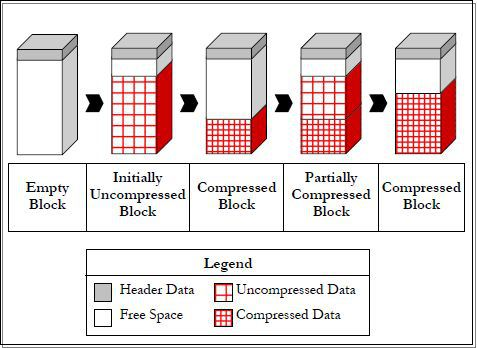
On the beginning block is empty (Empty Block). When data is inserted into block data is stored in uncompressed format (Initially Uncompressed block). When block is filled based on PCTFREE settings compression is triggered and block has compressed data and free space for another inserts (Compressed Block). So again next loads are loading uncompressed data (Partially Compressed Block) till again block is filled based on PCTFREE which triggers compression (Compressed Block).
NOTE – compression eliminates holes created due to deletions and maximizes contiguous free space.
Compression advisor DBMS_COMPRESSION:
Package DBMS_COMPRESSION has got following procedures:
GET_COMPRESSION_RATIO – analyzes the compression ratio of a table, and gives information about compressibility of a table .
GET_COMPRESSION_TYPE – returns the compression type for a specified row .
Example analysis of no compressed table for COMPRESS FOR OLTP
set serveroutput on
DECLARE

   blkcnt_cmp        NUMBER;

   blkcnt_uncmp      NUMBER;

   row_perblk_cmp    NUMBER;

   row_perblk_uncmp  NUMBER;

   cmp_ratio         NUMBER;

   comptype_str      VARCHAR2(60);

BEGIN

  dbms_compression.get_compression_ratio

  (

   'USERS',

   USER,

   'TEST_TBL_NC',

   NULL,

   DBMS_COMPRESSION.COMP_FOR_OLTP,

   blkcnt_cmp,

   blkcnt_uncmp,

   row_perblk_cmp,

   row_perblk_uncmp,

   cmp_ratio,

   comptype_str

  );

  dbms_output.put_line

  (

    'Number of blocks '                 ||chr(10)||

    '  in compressed table:   '         ||blkcnt_cmp||chr(10)||

    '  in uncompressed table: '         ||blkcnt_uncmp||chr(10)||

    'Number of rows per block'          ||chr(10)||

    '  in compressed table:   '         ||row_perblk_cmp||chr(10)||

    '  in uncompressed table: '         ||row_perblk_uncmp||chr(10)||

    'Test done for compression type: '  ||comptype_str||chr(10)||

    'Expected compression ratio: '      ||cmp_ratio||' to 1'

  );

END;

/

anonymous block completed

Number of blocks

  in compressed table:   344

  in uncompressed table: 1058

Number of rows per block

  in compressed table:   216

  in uncompressed table: 70

Test done for compression type: "Compress For OLTP"

Expected compression ratio: 3 to 1
Example how to check compression type for a row
SELECT

  dbms_compression.get_compression_type(

   USER,

   'TEST_TBL_OLTP',

   ROWID) compression_type

FROM test_tbl_oltp

WHERE ROWNUM <3;

COMPRESSION_TYPE
-----------------------------
               2
               2
Constants in DBMS_COMPRESSION package
1 – COMP_NOCOMPRESS – no compression
2 – COMP_FOR_OLTP – OLTP compression
4 – COMP_FOR_QUERY_HIGH – exadata high compression for query operations
8 – COMP_FOR_QUERY_LOW – exadata low compression for query operations
16 – COMP_FOR_ARCHIVE_HIGH – exadata high compression for archive operations
32 – COMP_FOR_ARCHIVE_LOW – exadata low compression for archive operations
Thank you for reading… This is Airy…Enjoy Learning 🙂