What is Oracle Restart feature in Oracle 11g:
With Oracle Real Application Clusters the Oracle database can be configured to restart as each node in the cluster is restarted. For single instance databases that are on a standalone server, often times the database is not configured to restart on a server bounce.
If you install Oracle Restart by installing the Oracle Grid Infrastructure for a standalone server and then create your database, the database is automatically added to the Oracle Restart configuration, and is then automatically restarted when required. However, if you install Oracle Restart on a host computer on which a database already exists, you must manually add the database, the listener, the Oracle Automatic Storage Management (Oracle ASM) instance, and possibly other components to the Oracle Restart configuration.
In the past, Oracle recommended to set the database for restart in the /etc/oratab file and create as script in the /etc/init.d directory to force the restart. Some times this approach often times did not work. How do we enable a restart of a single instance database successfully?
That means Oracle Restart is a component of the Oracle Grid Infrastructure (GI) package which is used to configure a restart of items on the server, ie Oracle Database (single instance). The added benefit of using Oracle Restart (Grid Infrastructure) is the usage of Automatic Storage Management (ASM) is included. As we already know Databases that are created after Oracle Restart is installed will use ASM and all previous databases (file system based) will not be configured in the Cluster Ready Service (CRS) stack. How do we add a database to the CRS stack after Oracle Restart is installed?
To add a database to the CRS stack, we need to use the Server Control (SRVCTL) command. The below command will add a database named “PAWASM” to the stack and enable it to be restarted when the server is restarted. Each of the options used can be looked up with the help option ($GRID_HOME/bin/srvctl –h).
Using Oracle Restart is a great approach to enabling single instance databases for successful restarts. Also, the ability to use Automatic Storage Management (ASM) and Cluster Ready Services (CRS) enables a DBA to learn more about these options before moving to a full Real Application Cluster (RAC).
Configuring Oracle Restart in Oracle 11g :
1: Adding Components to the Oracle Restart Configuration:
In most cases, creating an Oracle component on a host that is running Oracle Restart automatically adds the component to the Oracle Restart configuration. The component is then automatically restarted when required.
Adding a component to the Oracle Restart configuration is also referred to as “registering a component with Oracle Restart.”
The following are occasions when you must manually add components to the Oracle Restart configuration with SRVCTL:
You create an additional Oracle database on the same host computer using the CREATE DATABASE SQL statement.
You create a database service with DBMS_SERVICE.CREATE_SERVICE package procedure. (The recommended way is to use SRVCTL.)
Adding a component to the Oracle Restart configuration does not start that component. You must use a srvctl start command to start it.
When you manually add a database to the Oracle Restart configuration, you must also add the Oracle grid infrastructure software owner as a member of the OSDBA group of that database. This is because the grid infrastructure components must be able to connect to the database as SYSDBA to start and stop the database.
For example, if the host user who installed the grid infrastructure home is named grid and the OSDBA group of the new database is named dba, then user grid must be a member of the dba group.
Manually Adding components to the Oracle Restart configuration with SRVCTL:
$srvctl add object options
Where object can be datatabase,service,listener.
1: Adding a Database :
This example adds a database with a DB_UNIQUE_NAME of ORCL. The mandatory -o option specifies the Oracle home location. The -c option specifies a single-instance database.
[oracle@PAWASM Desktop]$ srvctl add database -d ORCL -o /u01/app/oracle/product/11.2.0/db_1 -c SINGLE2: Adding a Database Service :
For the database with the DB_UNIQUE_NAME of ORCL, this example both creates a new database service named SERVPAW and adds it to the Oracle Restart configuration.
[oracle@PAWASM Desktop]$ srvctl add service -d ORCL -s SERVPAW3: Adding the Default Listener :
This example adds the default listener to the Oracle Restart configuration.
[oracle@PAWASM Desktop]$ srvctl add listener <Listener Name>Adding Components with Oracle Enterprise Manager Database Control
With Oracle Enterprise Manager Database Control (Database Control), you can add only database instances and listeners to the Oracle Restart configuration.
To add a database instance with Database Control:
Access the Database Home page for the desired database instance.
In the High Availability section, next to the Oracle Restart label, click the Disabled link.
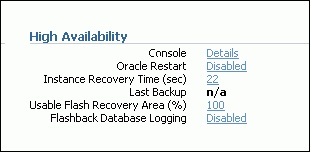
If the Oracle Restart label shows “Enabled,” then the database is already being managed by Oracle Restart, and there is no need to continue.
- If prompted for host credentials, enter credentials for the user who installed the database Oracle home, and then click Login.
- On the confirmation page, click Continue.
To add a listener with Database Control:
- Access the Database Home page for the desired database instance.
- In the General section, click the link next to the Listener label.
- In the High Availability section, next to the Oracle Restart label, click the Disabled link.
- On the confirmation page, click Continue.
2: Removing Components from the Oracle Restart Configuration:
When you use an Oracle-recommended method to delete an Oracle component, the component is also automatically removed from the Oracle Restart configuration. For example, if you use Database Configuration Assistant (DBCA) to delete a database, DBCA removes the database from the Oracle Restart configuration. Likewise, if you use Oracle Net Configuration Assistant (NETCA) to delete a listener, NETCA removes the listener from the Oracle Restart configuration.
If you use a non-recommended or manual method to delete an Oracle component, you must first use SRVCTL to remove the component from the Oracle Restart configuration. Failing to do so could result in an error.
To remove a component from the Oracle Restart configuration:
$srvctl remove object [options]Removing a Database
This example removes a database with a DB_UNIQUE_NAME of ORCL.
[oracle@PAWASM Desktop]$ srvctl remove database -d ORCL3: Disabling and Enabling Oracle Restart Management for a Component:
You can temporarily disable Oracle Restart management for a component. One reason to do this is when you are performing maintenance on the component. For example, if a component must be repaired, then you might not want it to be automatically restarted if it fails or if the host computer is restarted.
When maintenance is complete, you can re enable management for the component.
When you disable a component:
- It is no longer automatically restarted.
- It is no longer automatically started through a dependency.
- It cannot be started with SRVCTL.
- Any component dependent on this resource is no longer automatically started or restarted.
To disable or enable automatic restart for a component:
To disable a component, enter the following command:
$srvctl disable object [options]To enable a component, enter the following command:
$srvctl enable object [options]Disabling Automatic Restart for a Database
This example disables automatic restart for a database with a DB_UNIQUE_NAME of ORCL.
[oracle@PAWASM Desktop]$ srvctl disable database -d ORCLDisabling Automatic Restart for an Oracle ASM Disk Group
This example disables automatic restart for the Oracle ASM disk group named recovery.
[oracle@PAWASM Desktop]$ srvctl disable diskgroup -g recoveryEnabling Automatic Restart for an Oracle ASM Disk Group
This example reenables automatic restart for the disk group recovery.
[oracle@PAWASM Desktop]$ srvctl enable diskgroup -g recovery4: Viewing Component Status
You can use SRVCTL to view the running status (running or not running) for any component managed by Oracle Restart. For some components, additional information is also displayed.
$srvctl status object [options]Viewing Status of a Database
This example displays the status of the database with a DB_UNIQUE_NAME of ORCL.
[oracle@PAWASM Desktop]$ srvctl status database -d ORCLDatabase is running.5: Viewing the Oracle Restart Configuration for a Component
You can use SRVCTL to view the Oracle Restart configuration for any component. Oracle Restart maintains different configuration information for each component type. In one form of the SRVCTL command, you can obtain a list of components managed by Oracle Restart.
$srvctl config object optionsViewing a List of All Databases Managed by Oracle Restart
[oracle@PAWASM Desktop]$ srvctl config databaseAIRYASM
ORCLViewing the Configuration of a Particular Database
This example displays the configuration of the database with a DB_UNIQUE_NAME of ORCL.
for a Component
[oracle@PAWASM Desktop]$ srvctl config database -d ORCLDatabase unique name: ORCL
Database name: ORCL
Oracle home: /u01/app/oracle/product/11.2.0/dbhome_1
Oracle user: oracle
Spfile: +DATA/ORCL/spfileORCL.ora
Domain: pawasm.example.com
Start options: open
Stop options: immediate
Database role:
Management policy: automatic
Disk Groups: DATA
Services: mfg,sales6: Modifying the Oracle Restart Configuration
You can use SRVCTL to modify the Oracle Restart configuration of a component. For example, you can modify the port number that a listener listens on when Oracle Restart starts it, or the server parameter file (SPFILE) that Oracle Restart points to when it starts a database.
To modify the Oracle Restart configuration for a component:
[oracle@PAWASM Desktop]$ srvctl modify object optionsModifying the Oracle Restart Configuration for a Database
For the database with a DB_UNIQUE_NAME of ORCL, the following command changes the management policy to MANUAL and the start option to NOMOUNT.
[oracle@PAWASM Desktop]$ srvctl modify database -d ORCL -y MANUAL -s NOMOUNTWith a MANUAL management policy, the database is never automatically started when the database host computer is restarted. However, Oracle Restart continues to monitor the database and restarts it if a failure occurs.
As with the CRS on a full RAC, we can get the list of targets and check on the status of them using the same command (crs_stat –t –v).
[oracle@PAWASM Desktop]$ crs_stat -t -v

 Name           Type           R/RA   F/FT   Target    State     Host
-------------------------------------------------------------------------
 ora.DATA.dg    ora….up.type   0/5    0/     ONLINE    ONLINE    PAWASM
 ora….ER.lsnr   ora….er.type   0/5    0/     ONLINE    ONLINE    PAWASM
 ora.asm        ora.asm.type   0/5    0/     ONLINE    ONLINE    PAWASM
 ora….ORCL.db   ora….se.type   0/2    0/1    ONLINE    ONLINE    PAWASM
 ora.cssd       ora.cssd.type  0/5    0/5    ONLINE    ONLINE    PAWASM
 ora.diskmon    ora….on.type   0/10   0/5    OFFLINE   OFFLINE
 ora.evmd       ora.evm.type   0/10   0/5    ONLINE    ONLINE    PAWASM
 ora.ons        ora.ons.type   0/3    0/     OFFLINE   OFFLINE
Thank you for Reading…This is Airy… Enjoy 🙂